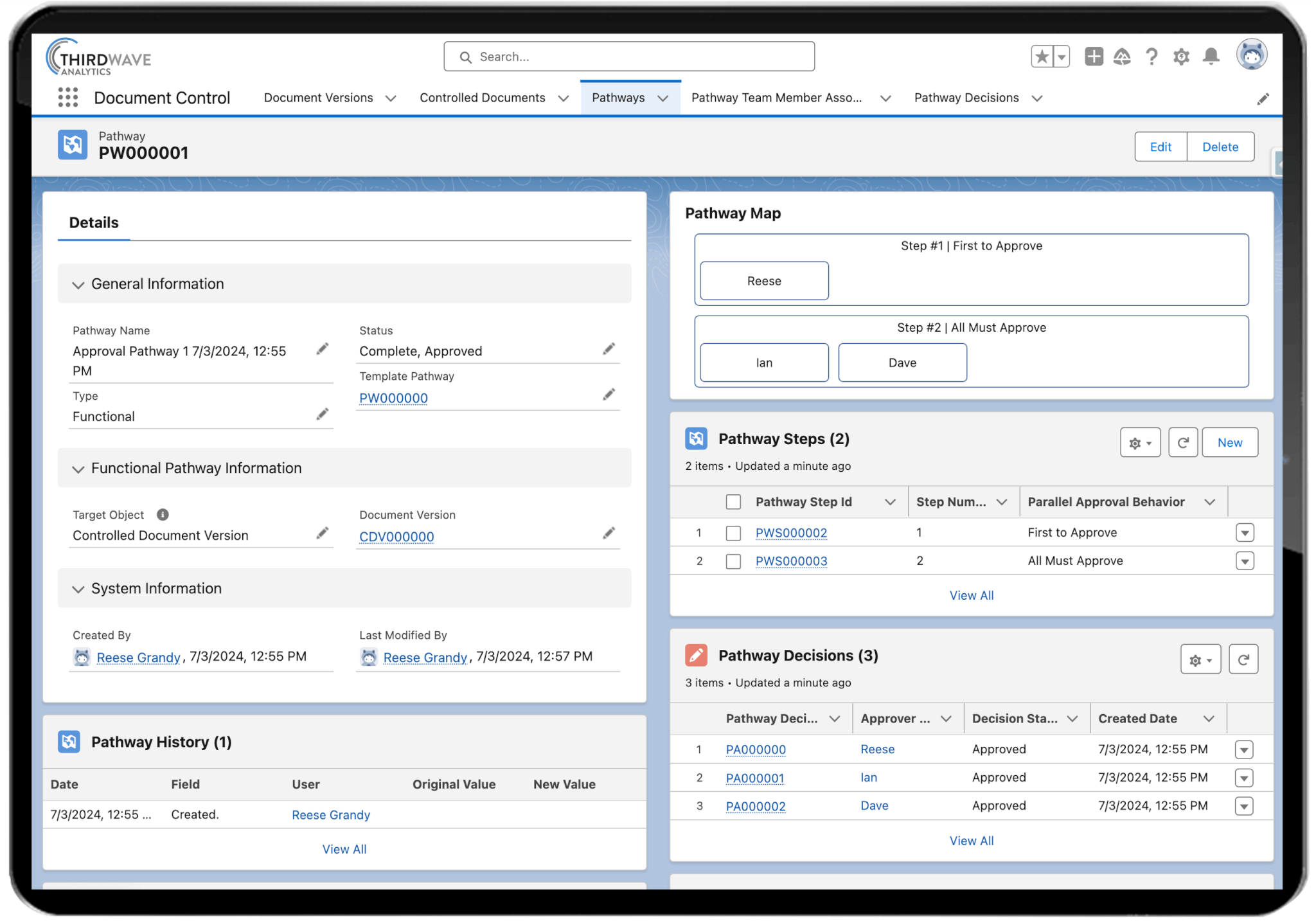
The Lockbox QMS Document Control system allows users to track controlled documents through revision, approval, and retirement. Users can store controlled documents, create new versions and route them for approval, and capture comments and revisions throughout the approval process. Together these features create a powerful and versatile document management software that is easily connected to other Lockbox LIMS and QMS modules.
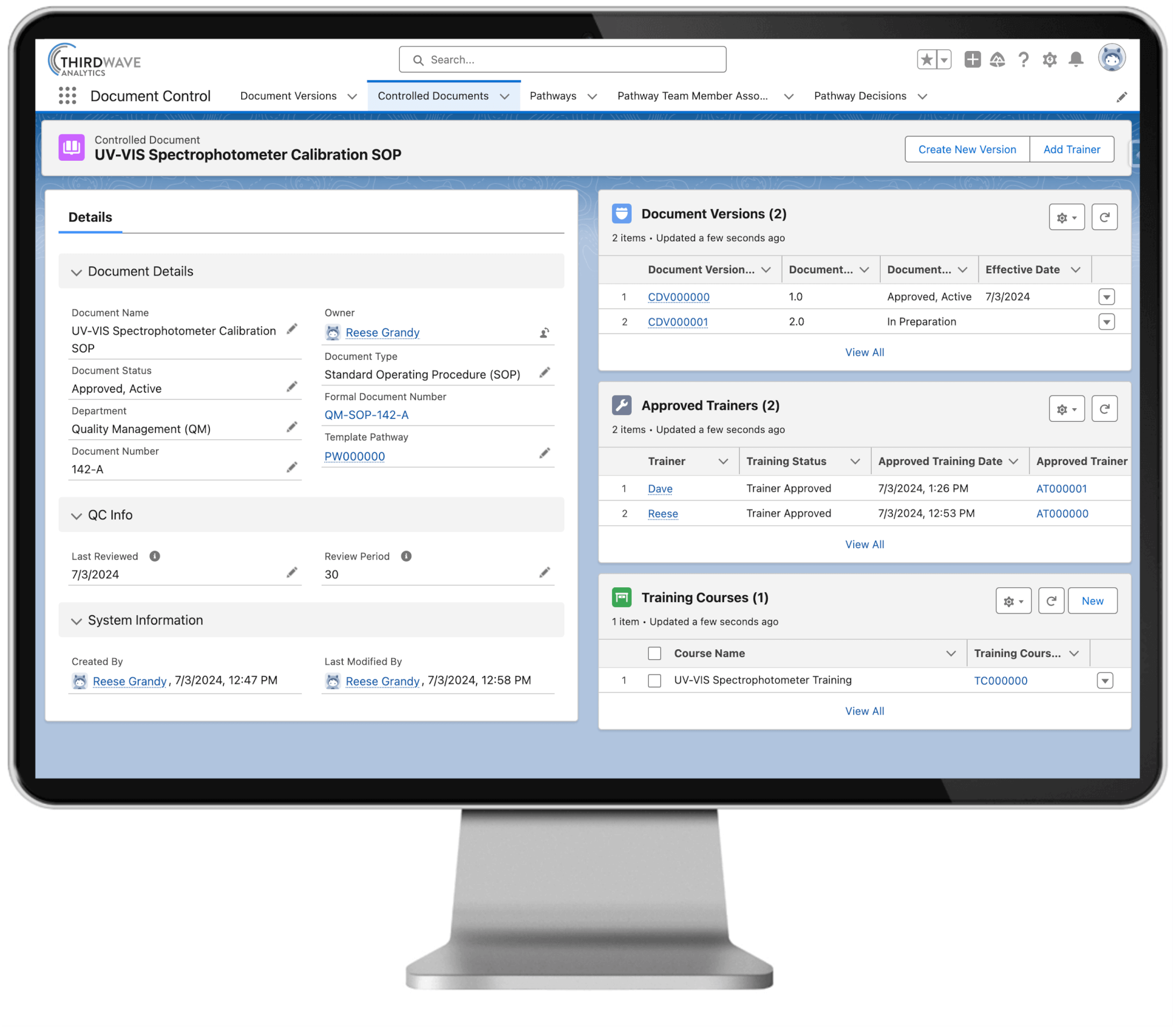
Lockbox QMS Document Control enables you to track document versions, revision notes, and approvals. This secure, centralized, and searchable system is the key to efficiently managing all your controlled documents.
With Lockbox QMS Document Control you can manage controlled documents as they undergo revisions and approvals, view historic document versions, and capture revision notes. This centralized document repository allows authorized users to easily search for and access their lab’s controlled documents.
Controlled documents can be moved through formal review, approval, distribution, and revision, all within Lockbox QMS. To ensure the correct lab personnel reviews each controlled document before it becomes active, controlled documents can be routed through customized approval workflows.
Document control software helps your laboratory organize, manage, and track quality documents such as SOPs, work instructions, forms, policies, and training materials. Instead of relying on shared folders or paper documents, you can manage document versions, approvals, reviews, and distribution from one centralized system. The Lockbox QMS Document Control module gives you a secure, organized way to keep controlled documents accurate, accessible, and audit-ready.
You can manage virtually any controlled document used in your laboratory, including standard operating procedures (SOPs), work instructions, quality manuals, forms, policies, training documents, validation records, equipment documentation, and other quality system records. Keeping these documents in one location makes them easier to find, review, and maintain.
The Lockbox QMS Document Control module automatically maintains version history so you always know which version of a document is current. Previous versions remain available for historical reference, while users are directed to the latest approved version — helping prevent outdated procedures from being used and giving you a complete audit trail of every change.
Yes. You can configure document review and approval workflows that match your lab’s internal quality processes. Documents route automatically to designated reviewers and approvers, so changes are reviewed, approved, and released before they become available to users.
The Lockbox QMS Document Control module maintains complete documentation throughout the document lifecycle, including version history, approvals, electronic signatures, review dates, and audit trails. These features support compliance with standards such as ISO 17025, ISO 15189, GMP, GLP, 21 CFR Part 11, EU Annex 11, CLIA, and CAP, along with other industry-specific requirements.
Yes. The Lockbox QMS Document Control module can be configured to automatically notify users when documents are approaching their review or expiration dates, helping you keep procedures current and reducing the risk of documents staying in use past their scheduled review period.
The Lockbox QMS Document Control module supports electronic signatures for document approvals and other controlled quality processes. Users authenticate their identity before signing, creating a secure, traceable record of approval that helps you meet electronic record and signature requirements, including 21 CFR Part 11.
Yes. The Lockbox QMS Document Control module uses role-based permissions to control document access. Administrators decide who can create, edit, review, approve, or view each document, so users only see information relevant to their role.
The Lockbox QMS Document Control and Training Management module work together to keep your team up to date on new or revised procedures. When an SOP is updated, you can assign training to affected personnel and maintain records showing they’ve reviewed and acknowledged the latest version.
Yes. Every document keeps a complete revision history — what changed, who made the change, who approved it, and when it took effect — giving you full traceability for internal audits and regulatory inspections.
Effective document control helps ensure your team is following current procedures, reduces the risk of outdated documents being used, and improves consistency across lab operations. It also makes audits and inspections easier by keeping records organized and readily accessible.
Yes. The Lockbox QMS Document Control module helps you move from paper documents and shared network folders to a centralized digital system — reducing manual handling, improving version control, simplifying approvals, and giving your team secure access to the latest approved documents whenever they need them.
The Lockbox QMS Document Control module keeps your controlled documents, approvals, revision history, SOPs and audit trails in one place, so you’re not searching through paper files or shared folders. Auditors and quality teams can quickly pull the latest approved documents, review prior versions, and confirm who reviewed, approved, and acknowledged each one.