
New Blog Post Published Today! | How you can configure Lockbox LIMS Yourself

Lockbox QMS Training Management

Create Virtual Personnel Binders for your Lab Team Members

Give your quality and lab managers the tools they need to manage employee training records and track training completion. With Lockbox QMS Training, team members can be notified of overdue training and managers can review training records in each team member’s Report Card. This centralized training repository works to ensure all lab members are up-to-date with their training requirements.

A Complete View of Your Team Members’ Training Requirements

Lockbox QMS Training empowers managers to view, track, and plan individual or group training requirements all in one place.

Lockbox QMS Training Module

Lab Training Report Card

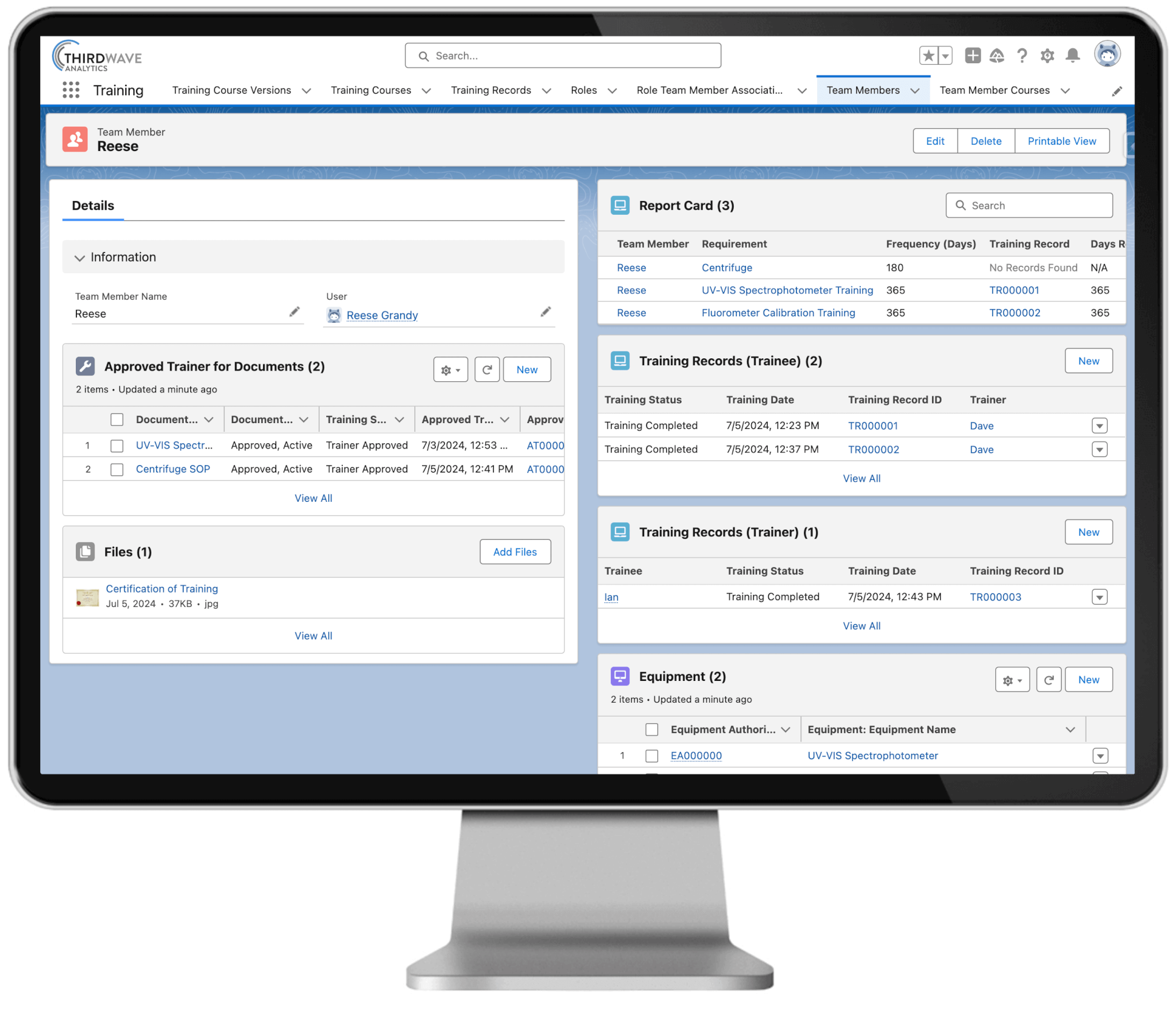
Lab managers have a 360° view of their teams’ training requirements and completion with lab training report cards. This makes it simple to review each team member’s training history, future training requirements, and current training status.

  • Quickly and easily visualize team members’ completed, pending, and past-due training requirements
  • Automate alerts and reminders for upcoming training sessions, expiring certifications, and overdue training activities
  • Retain all training certifications and past training records
  • Track training course participation and completion
  • View the protocols, equipment, and controlled documents the team member is trained on
  • Restrict protocol execution and equipment use based on training completion
  • Store each user’s training record in a training Report Card
Lockbox QMS Training Course

Digital Training Plan

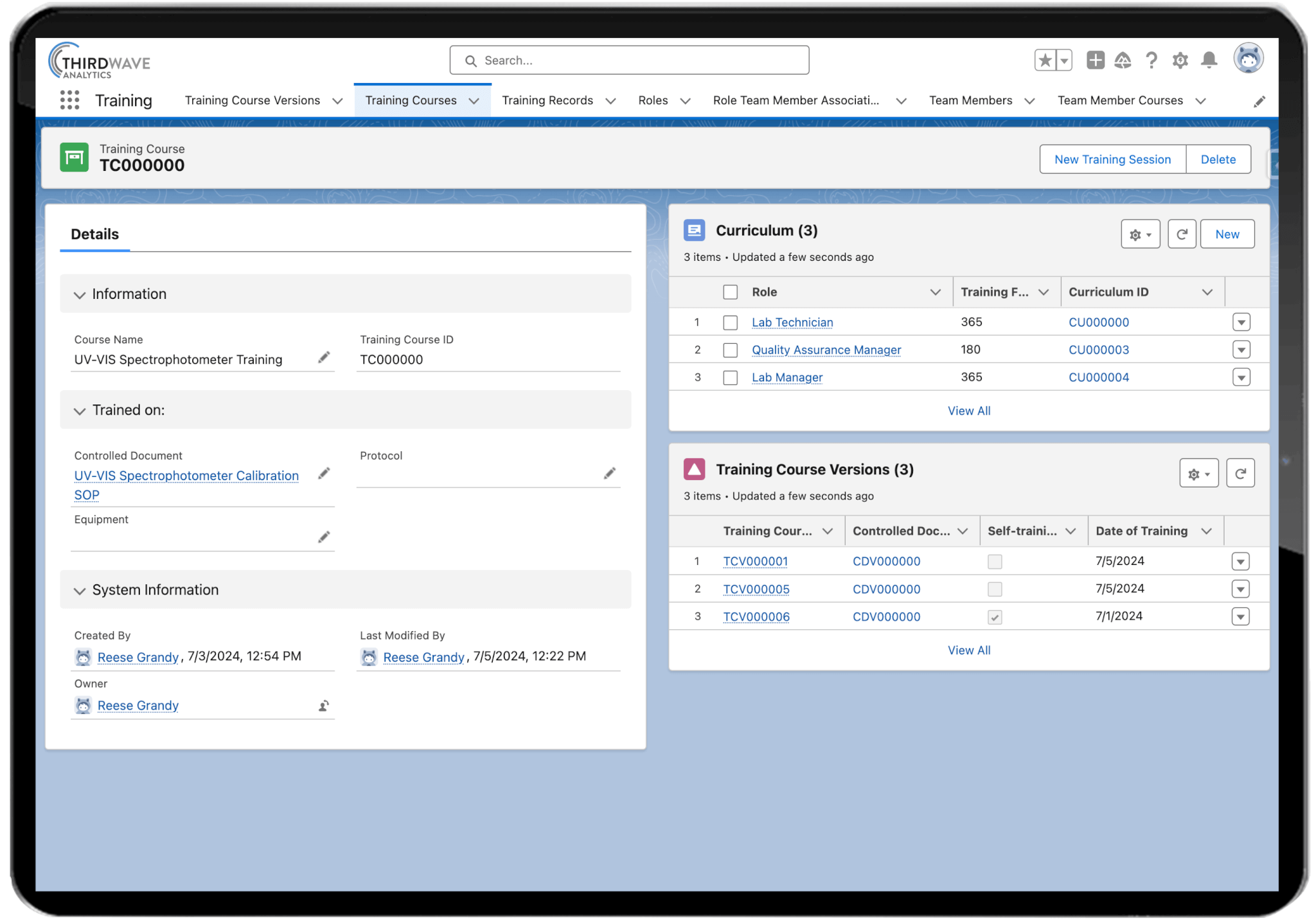
Use the Lockbox QMS Training Plan to automatically generate a list of training courses based on each team member’s roles and responsibilities. View training completeness across your entire organization.

  • Generate a curriculum of training courses based on each team member’s roles
  • Capture the training participants, training date, and trainer
  • Automate retraining by setting training frequency and reminder notifications
  • Assign team members as approved trainers for training courses
  • Receive automatic reminders and past-due notifications of pending or expired training requirements
  • Easily search by team member or training course to retrieve specific training records

Questions?

Check out some of our most frequently asked questions about Lockbox QMS Training Management functionality.

The Lockbox QMS Training Management module gives you one place to manage employee training from start to finish. You can assign required courses, track completion, monitor due dates, and maintain complete training records without relying on spreadsheets or paper files. Automated workflows help ensure everyone stays up to date with the training they need.

Any laboratory that needs to document employee training and demonstrate compliance can benefit from the QMS Training Management module. Whether you work in pharmaceutical, biotech, clinical diagnostics, manufacturing, or research, Lockbox QMS helps you manage training more efficiently while maintaining complete, audit-ready records.


Yes. The Lockbox QMS Training Management module allows you to create role-based training plans so employees are automatically assigned the courses and qualifications required for their job. When responsibilities change or new employees join your team, you can quickly assign the appropriate training without starting from scratch.

Yes. Automatic email notifications remind employees when training is assigned, coming due, or overdue. These reminders help keep training on schedule and reduce the need for managers to manually follow up with individual team members.

You can manage virtually any type of laboratory training, including SOP reviews, instrument training, quality procedures, safety training, competency assessments, onboarding, continuing education, and other organization-specific training requirements. All training records are stored in one centralized location for easy access.

The Lockbox QMS Training Management module gives you real-time visibility into employee training status. You can quickly see who has completed required training, who still has assignments in progress, and who is overdue. Dashboards and reports make it easy to monitor compliance across individuals, departments, or the entire organization.

When a controlled document is revised, Lockbox QMS can automatically assign the updated SOP to the employee(s) who need to review it. The system tracks who has acknowledged the new version and maintains a complete record of that training, so you always know your team is working from the current procedure — not an outdated one.

The Lockbox QMS Training Management module helps you maintain complete training records, electronic acknowledgements, completion dates, competency records, and audit trails. This makes it easier to demonstrate compliance with quality and regulatory requirements such as ISO 17025, Good Manufacturing Practices (GMP), GLP, 21 CFR Part 11, EU Annex 11,CLIA, CAP, and other applicable standards.

Yes. In addition to tracking completed courses, the Lockbox QMS Training Management module helps you maintain records of employee competencies, qualifications, certifications, and approved trainers. This makes it easier to verify that employees are qualified to perform specific laboratory tasks.

Yes. The Lockbox QMS Training Management module can track employee qualifications and training records so you can verify that only authorized, properly trained personnel perform specific procedures or operate certain laboratory instruments. This helps support both quality management and regulatory compliance.

Instead of gathering training records from multiple spreadsheets or filing cabinets, you can quickly access complete employee training histories from one centralized system. Training assignments, completion dates, electronic acknowledgements, competency records, and audit trails are readily available, helping you prepare for internal and external audits with confidence.

Yes. The Lockbox QMS Training Management module includes reporting tools that help you monitor training completion, overdue assignments, employee qualifications, and overall compliance. These reports give managers and quality teams better visibility into training progress and help identify areas that may need attention.

As your laboratory grows, managing training manually becomes more time-consuming and increases the risk of missed deadlines or incomplete records. The Lockbox QMS Training Management module automates many of these tasks, helping you reduce administrative work, improve consistency, and maintain accurate, audit-ready training records.

No. The Lockbox QMS Training Management module is designed to manage and document training—not deliver training content. It tracks training assignments, completion status, qualifications, training records and more, helping laboratories demonstrate compliance and ensure personnel are qualified to perform assigned tasks. 

Built on the world’s most secure cloud computing platform

Integration Ready


Published APIs for easy integration with all major platforms

Safe and Secure


Built on the world's most popular cloud computing platform trusted by millions world-wide

Top Choice


Chosen by labs of all sizes, including industrial contract labs and university core labs

Reports and Dashboards


Report on metrics captured throughout your sample workflow

Experience the power of the Lockbox QMS Quality Management System today

Book a Demo

×
×