Lockbox LIMS Features: A Guide to Modern Laboratory Management
What Should You Expect from a Modern LIMS?
A modern LIMS should do more than track samples and store laboratory data. It should help connect people, processes, and information; reduce manual work; improve visibility across laboratory operations; and adapt as your workflows and requirements evolve.
Lockbox LIMS is Third Wave Analytics’ configurable, 100% cloud-based Laboratory Information Management System, designed to grow and evolve with your laboratory. Its modular approach allows organizations to select the functionality they need today and easily add to this capacity as their workflows, user base, and operational requirements change.
Since its inception, Third Wave Analytics has been committed to continually expanding and improving the capabilities of Lockbox LIMS. That evolution continues in 2026. Lockbox LIMS version 2.21 was recently released, introducing the platform’s latest features and enhancements. These exciting upgrades incorporate emerging AI capabilities and provide enhancements in sample and storage management, workflow automation, inventory management, instrument management, reporting, and integrations. Lockbox LIMS gives laboratories a flexible foundation for managing both their present day-to-day operations and their future growth.
So, what can today’s Lockbox LIMS help your laboratory accomplish? Let’s explore some of its key capabilities.
The Lockbox LIMS Foundation
Every Lockbox LIMS subscription starts with our base Sample Management modules: Sample Tracking and Freezer and Storage Management. These core modules provide the foundation for managing your lab’s essential workflows. As your laboratory’s needs evolve, you can expand your Lockbox LIMS subscription with additional modules and capabilities tailored to your specific processes and requirements.
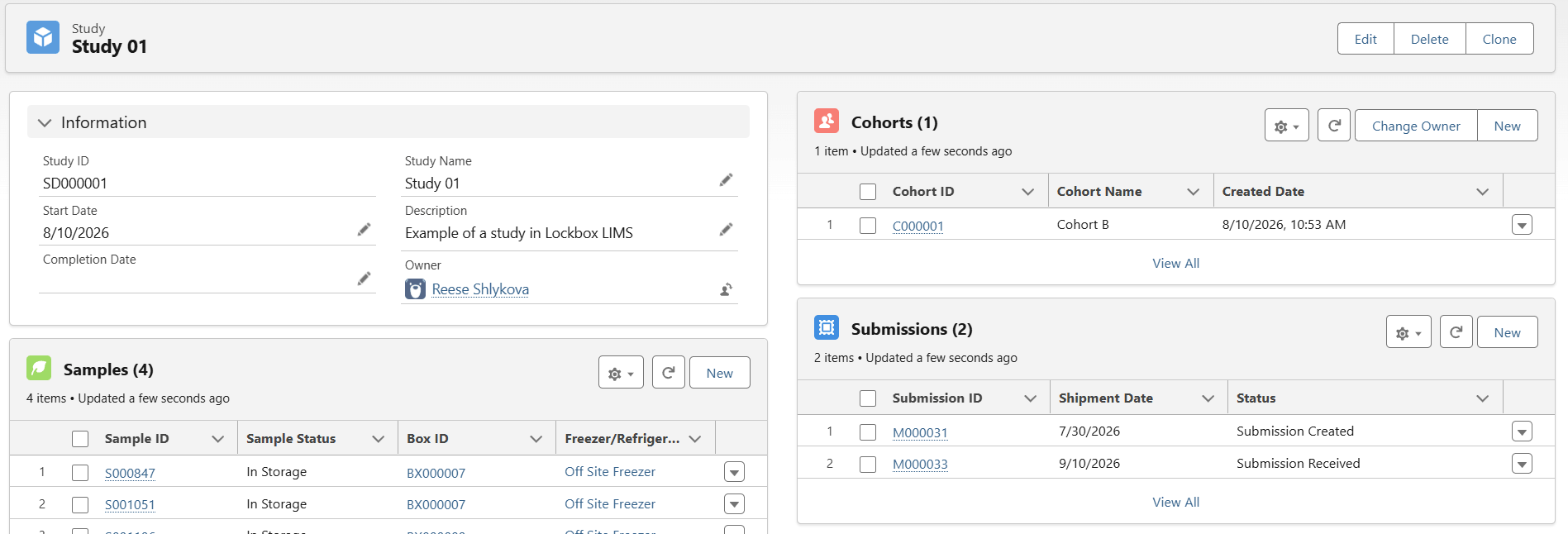
Managing a study or research project often means coordinating far more than samples alone. Participants or subjects, visits, cohorts, requisitions, submissions, tasks, and supporting data all need to stay connected throughout the lifecycle of a project. Lockbox LIMS brings this information together in a centralized environment, giving laboratory teams greater visibility into study activities and making it easier to track progress from one stage to the next.
Study and Project Management Capabilities
With Lockbox LIMS, laboratories can:
- Create and manage projects or studies to organize ongoing laboratory and research activities.
- Associate participants or subjects (including human participants or animals) with projects, studies, and samples.
- Organize subjects into cohorts and track visits, activities, and other milestones as they progress through a study.
- Create submissions associated with projects or studies and capture important shipment, container, and specimen condition information to support biorepository and sample management workflows.
- Create requisitions and associate them with subjects or specimens.
- Import samples in bulk using CSV manifests and automatically associate them with the appropriate submission or project.
- Create and assign tasks related to studies, projects, participants, and requisitions to help teams coordinate activities and responsibilities.
- Communicate directly with study participants, third-party service requestors, or collaborators from within Lockbox LIMS.
- Monitor project and study status and use reports and dashboards to visualize key metrics and activity.
By connecting study information, samples, people, and activities in one system, Lockbox LIMS gives laboratory teams a more complete view of their research. This comprehensive study record stays whole from enrollment through closeout, with participants, samples, and activities tied together in one place, so teams spend less time reconciling spreadsheets and more time moving the study forward.
Sample Tracking Capabilities
Every sample has a story, from accessioning and initial quality control through processing, testing, storage, and final disposition. Maintaining a complete, traceable record throughout that lifecycle is essential for protecting sample integrity, improving laboratory efficiency, and ensuring teams can quickly find the information they need.
Lockbox LIMS provides end-to-end sample tracking capabilities that give laboratory teams visibility into a sample’s history, status, relationships, testing, and location. The system can support a wide range of sample types, including biological specimens, manufactured materials, and environmental samples, while maintaining complex relationships among parent samples, aliquots, derived samples, libraries, pooled samples, batches, and plates.
Sample Check-In: Simplify Accessioning from the Start
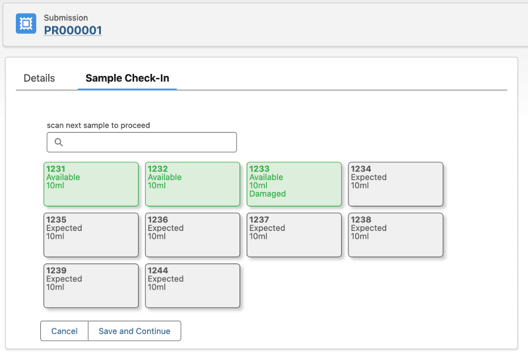
Accurate sample tracking begins the moment a sample arrives at the laboratory. Lockbox LIMS’ Sample Check-In tool helps users accession incoming samples quickly and consistently while maintaining accurate tracking, chain of custody, and the information needed for downstream processing.
During check-in, users can scan sample barcodes to identify incoming samples and automatically update their status from Expected to Available. If initial quality control is required, the accessioner can also capture or update essential sample information, such as QC Status and Volume, as part of the same check-in process.
By incorporating barcode scanning, status updates, and initial QC data capture into a streamlined accessioning workflow, Sample Check-In reduces manual steps and establishes a reliable sample record from the moment the material enters the laboratory.
And check-in is only the beginning. Once a sample enters the laboratory, Lockbox LIMS can maintain its identity, lineage, location, status, testing history, and related data as it moves through each stage of its lifecycle.
After accessioning, here’s what Lockbox LIMS continuously tracks:
Sample Lineage & Traceability
- Maintain complete sample lineage across submitted samples, aliquots, derived samples, libraries, and pooled samples.
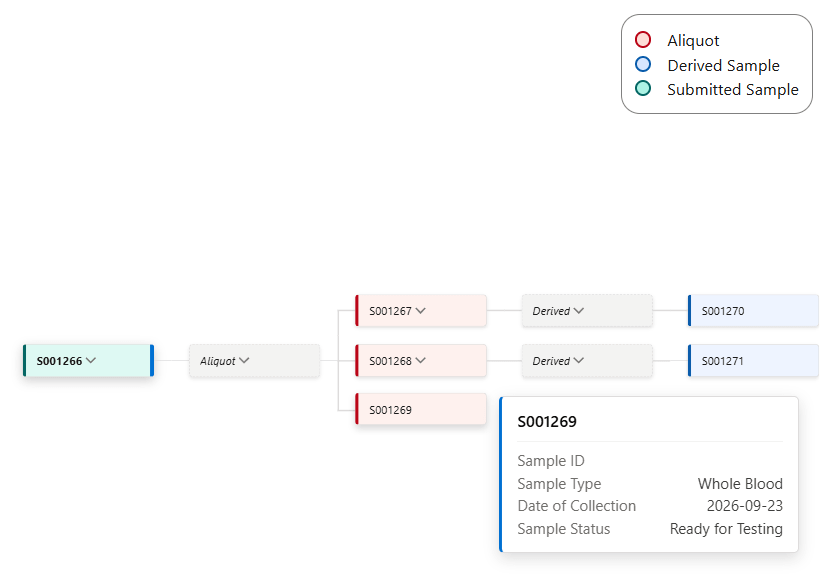
- Visualize complex sample lineage using Lockbox’s Object Hierarchy Visualizer, which provides a graphical, family-tree view of connected sample records. Users can quickly trace parent-child relationships across samples, aliquots, and derived materials and use configurable color coding to distinguish sample types or other attributes, making complex relationships easier to understand at a glance.
- Associate samples with the specific version of the protocol, test, or workflow used to process them.
Sample Identification & Barcode Tracking
- Create custom sample types, naming conventions, statuses, and tracking indicators that reflect your laboratory’s processes.
- Import hundreds or thousands of sample records in bulk using configurable CSV manifests that can capture identifiers, volume, concentration, and other laboratory-specific data.
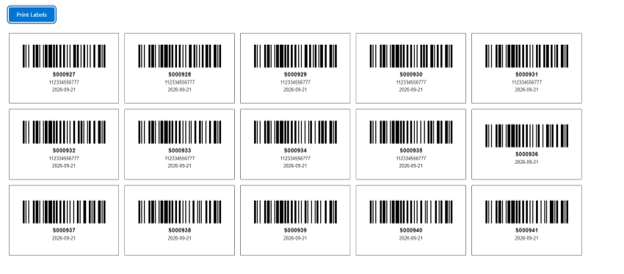
- Generate and print unique barcode labels and scan samples to retrieve information, perform workflow actions, or track movement into and out of storage.
Sample Storage & Location Tracking
- Track samples down to their exact position within configurable boxes, plates, and other storage locations while maintaining a history of previous locations.
- Assign samples to plates or batches and execute protocols on individual samples or groups of samples.
- Track freeze/thaw cycles and configure automated notifications when defined cycle limits are reached.
- Track sample expiration dates and use automated alerts and notifications to support quality control.
Audit Trails & Compliance Reporting
- Attach supporting documentation including PDFs, images, and spreadsheets directly to sample records.
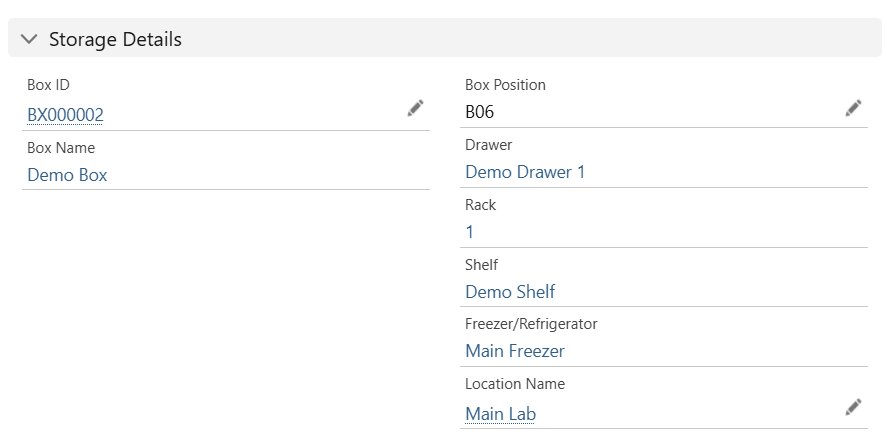
- Maintain a detailed field-level audit history showing who changed information, when it was changed, and the previous and updated values.
- Store testing information and recorded data as samples move through laboratory workflows.
- Create branded PDF reports containing test results and distribute completed reports to customers or collaborators.
- Use reports and dashboards to monitor metrics captured throughout the sample workflow.
By connecting sample identity, lineage, location, testing, storage history, and related data in one system, Lockbox LIMS gives laboratories a complete view of each sample’s journey. That’s the difference between a limited sample tracking system and a comprehensive sample management system. With Lockbox LIMS, a team can pull up a sample at any point in its lifecycle and see not just where it is, but its full story – where it’s been, what happened to it, and what it’s connected to – without chasing down a paper trail.
Freezer and Storage Management Capabilities
Knowing that a sample is somewhere in the freezer isn’t enough. Laboratories need to know exactly where each sample is stored, how much storage capacity remains, who has interacted with it, and where it has been throughout its lifecycle.
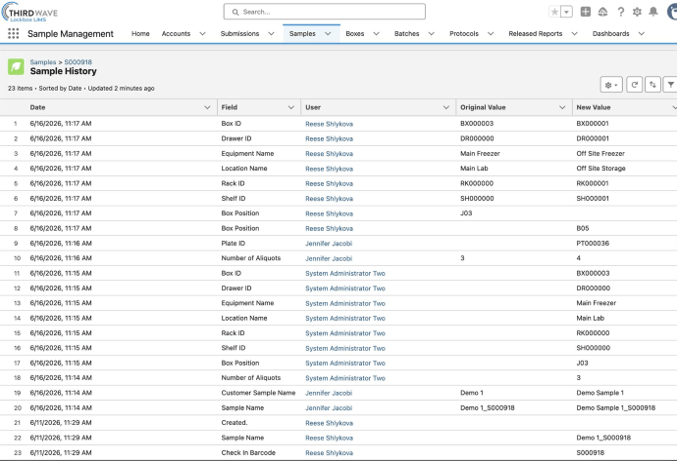
Lockbox LIMS provides flexible storage management capabilities that allow laboratories to digitally recreate their physical storage environment and maintain visibility into samples and other materials across locations. Using point-and-click configuration tools, laboratories can model storage environments ranging from a single freezer to multiple rooms, buildings, or laboratory sites without programming.
From hierarchy to handling, Lockbox LIMS covers every layer of storage:
Storage Hierarchy & Multi-Site Configuration
- Configure detailed storage hierarchies that reflect real-world environments, including buildings, rooms, storage units, freezers, tanks, incubators, shelves, racks, drawers, boxes, and individual positions.
- Create custom layouts for different types of storage equipment and configure unique combinations of shelves, racks, and other attributes for each unit.
- Add custom fields and attributes to storage locations to capture information specific to the laboratory’s equipment and processes.
- Configure individual storage locations across multiple laboratories or sites, providing centralized visibility into distributed storage environments.
Box Mapping & Barcode Tracking
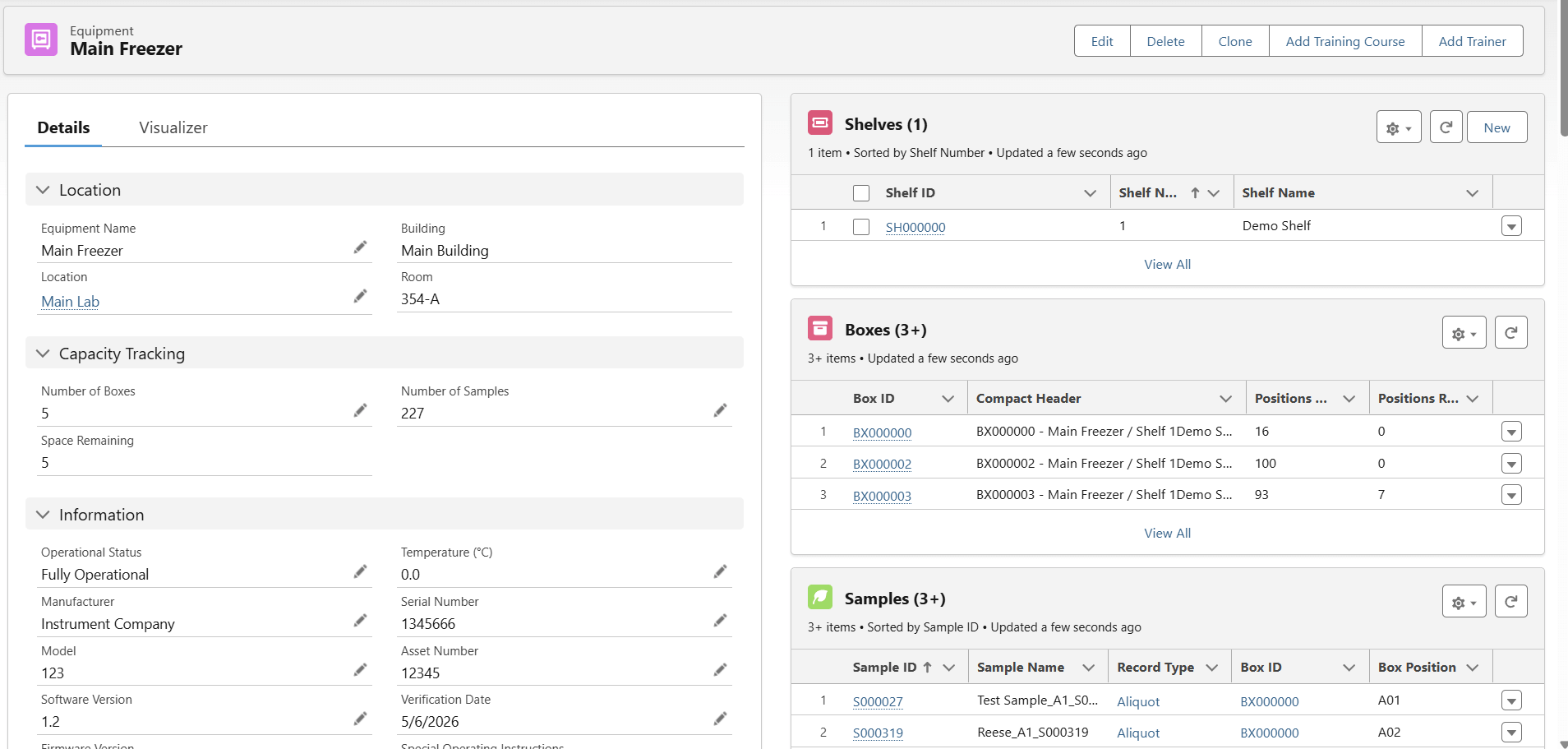
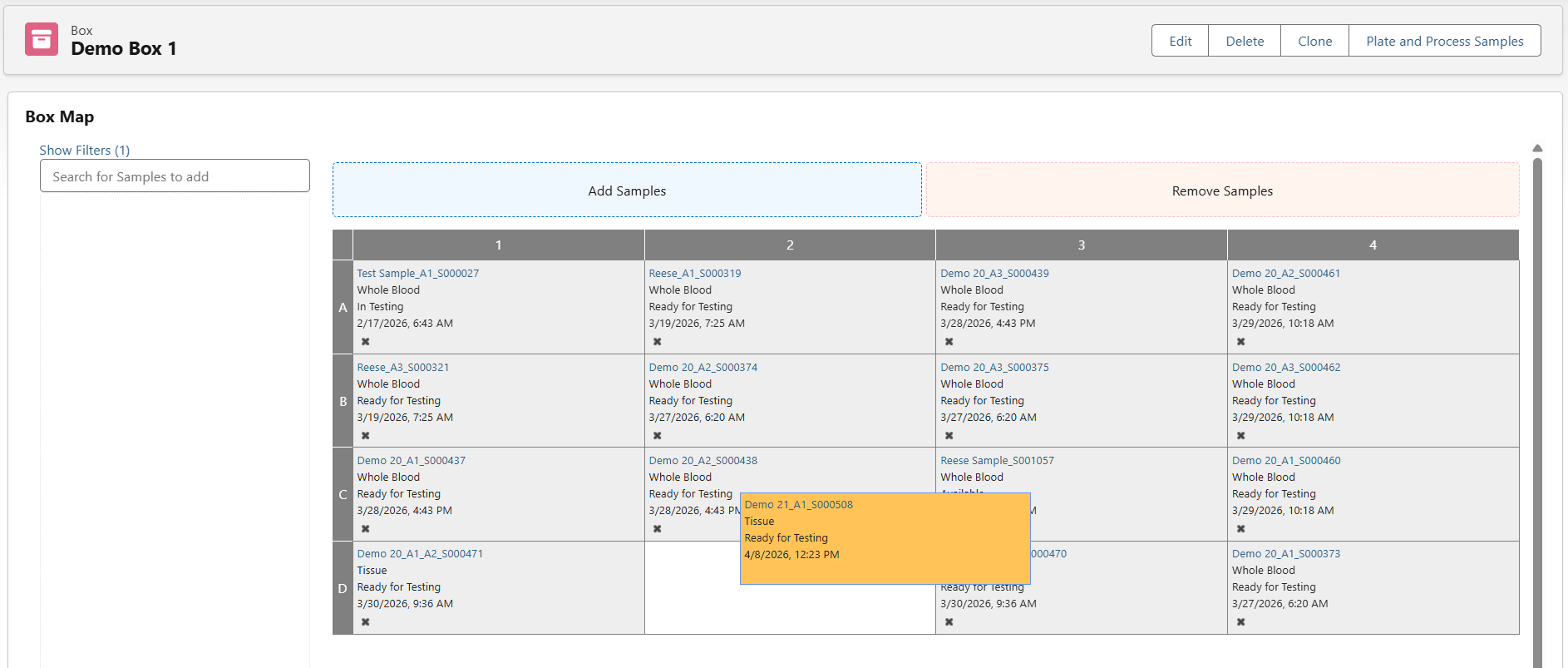
- Create configurable sample box layouts using customized rows, columns, labels, and position numbers.
- Use visual box maps to view sample contents and quickly identify occupied and available positions.
- Assign samples to boxes and automatically populate available positions.
- Move samples among boxes and positions while automatically maintaining a history of their previous storage locations.
- Search for samples within boxes and customize the sample information displayed on box maps.
- Scan storage equipment barcodes to quickly retrieve information associated with a specific freezer, box, or other storage unit.
Storage Audit Trails & Access Control
- Apply profiles and permissions to control storage visibility across laboratory groups and users.
- Maintain audit trails showing historical sample locations and the laboratory personnel who interacted with or moved samples.
- Track sample lineage within storage, including relationships among parent samples, aliquots, and derived samples.
Storage Alerts & Equipment Maintenance
- Track freeze/thaw cycles and configure automated notifications when samples reach defined cycle limits.
- Set sample expiration dates and create configurable alerts to support quality control and prevent expired materials from being overlooked.
- Automate reminders for calibration, preventive maintenance, and warranty expiration associated with storage equipment.
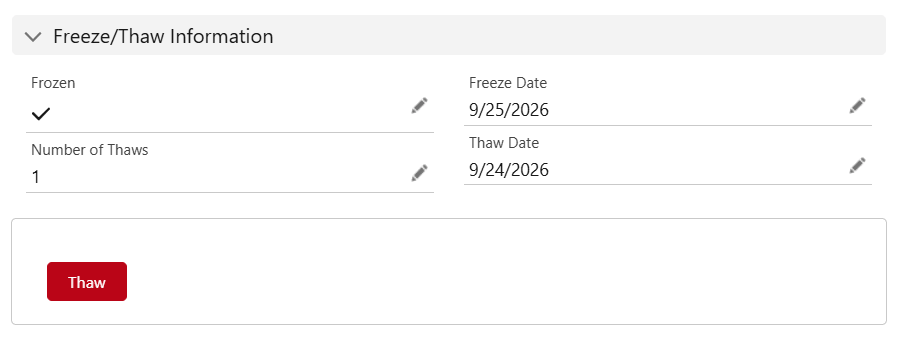
By creating a digital representation of the laboratory’s physical storage environment, Lockbox LIMS helps teams quickly locate samples, manage available capacity, monitor storage history, and maintain traceability as materials move throughout the laboratory. For lab managers, that means capacity planning and compliance reporting are a few clicks away, not a walk to the freezer room with a clipboard.
More Modules = More LIMS Capabilities
Every Lockbox LIMS subscription includes core capabilities for sample tracking and freezer and storage management. Laboratories can then add modules based on their specific workflows and requirements, creating a system that evolves as operations grow or change.
Third Wave Analytics offers a full range of additional modules and add-ons covering all your laboratory functions, including the Protocol Execution, Inventory Management, and NGS (next-generation sequencing) modules, and a comprehensive quality management system (Lockbox QMS). With Lockbox LIMS and Lockbox QMS, you can build out exactly the capabilities your lab needs.
Protocols and Procedures Capabilities
Laboratory workflows can range from a simple SOP with only a few steps to complex testing processes that capture hundreds of results. Lockbox LIMS Protocol Execution provides a configurable environment for standardizing these processes, guiding users through each step, capturing required data, and automating actions as work progresses.
From setup to execution to results, Protocol Execution supports the full lifecycle of laboratory testing:
Workflow & SOP Configuration
- Configure workflows, protocols, procedures, SOPs, individual steps, required materials, and data collection fields around laboratory-specific processes.
- Enforce required activities, such as step completion and lot number capture, to help promote consistent execution and data collection.
- Configure the Protocol Execution experience around individual procedures, including the information displayed in page headers, data-entry column widths, action-button labels, and other user interface text.
- Configure data-entry screens to present users with the information and fields needed at specific stages of a procedure.
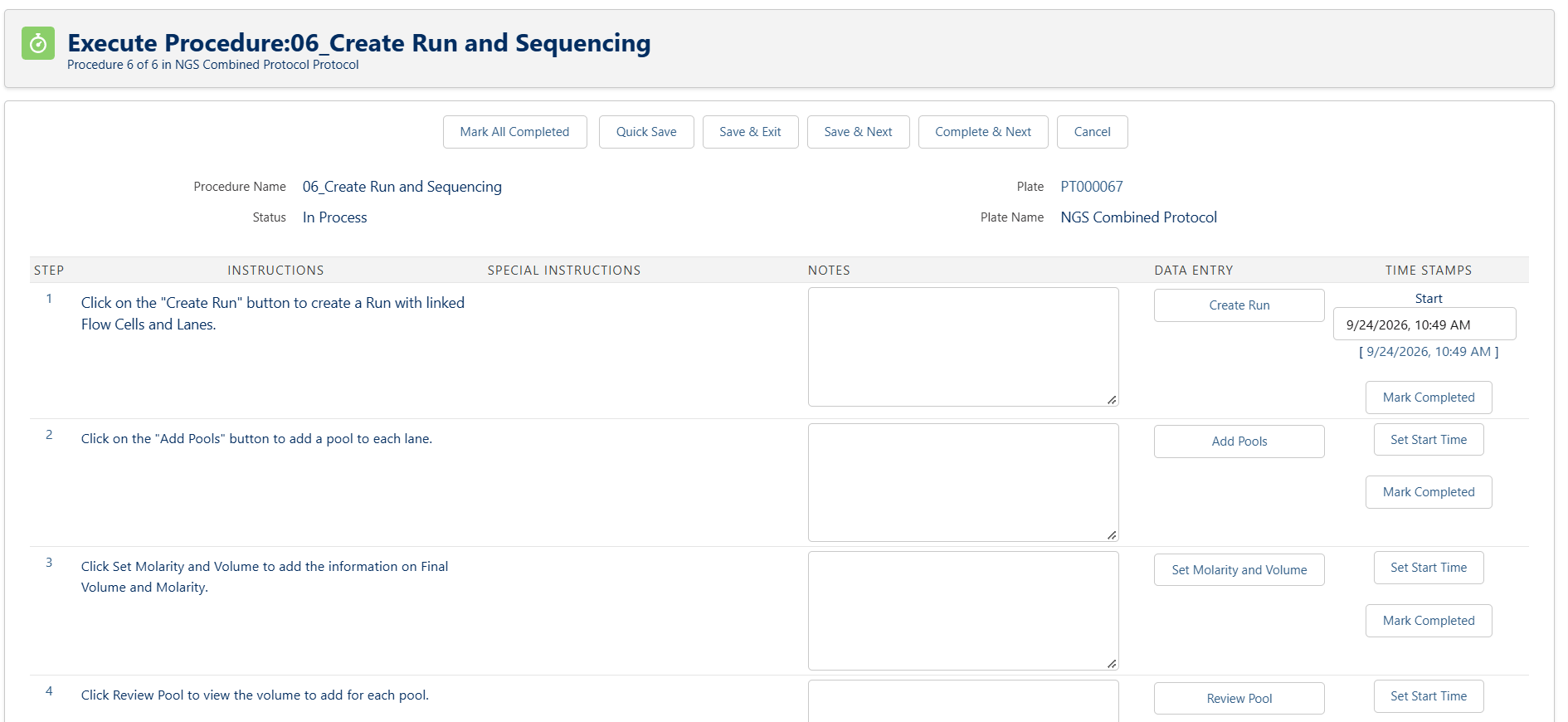
Plate Mapping & Test Result Management
- Define reportable and non-reportable test results and establish upper and lower analyte ranges and out-of-specification (OOS) thresholds.
- Bundle multiple tests together and execute protocols on individual samples, plates, or batches.
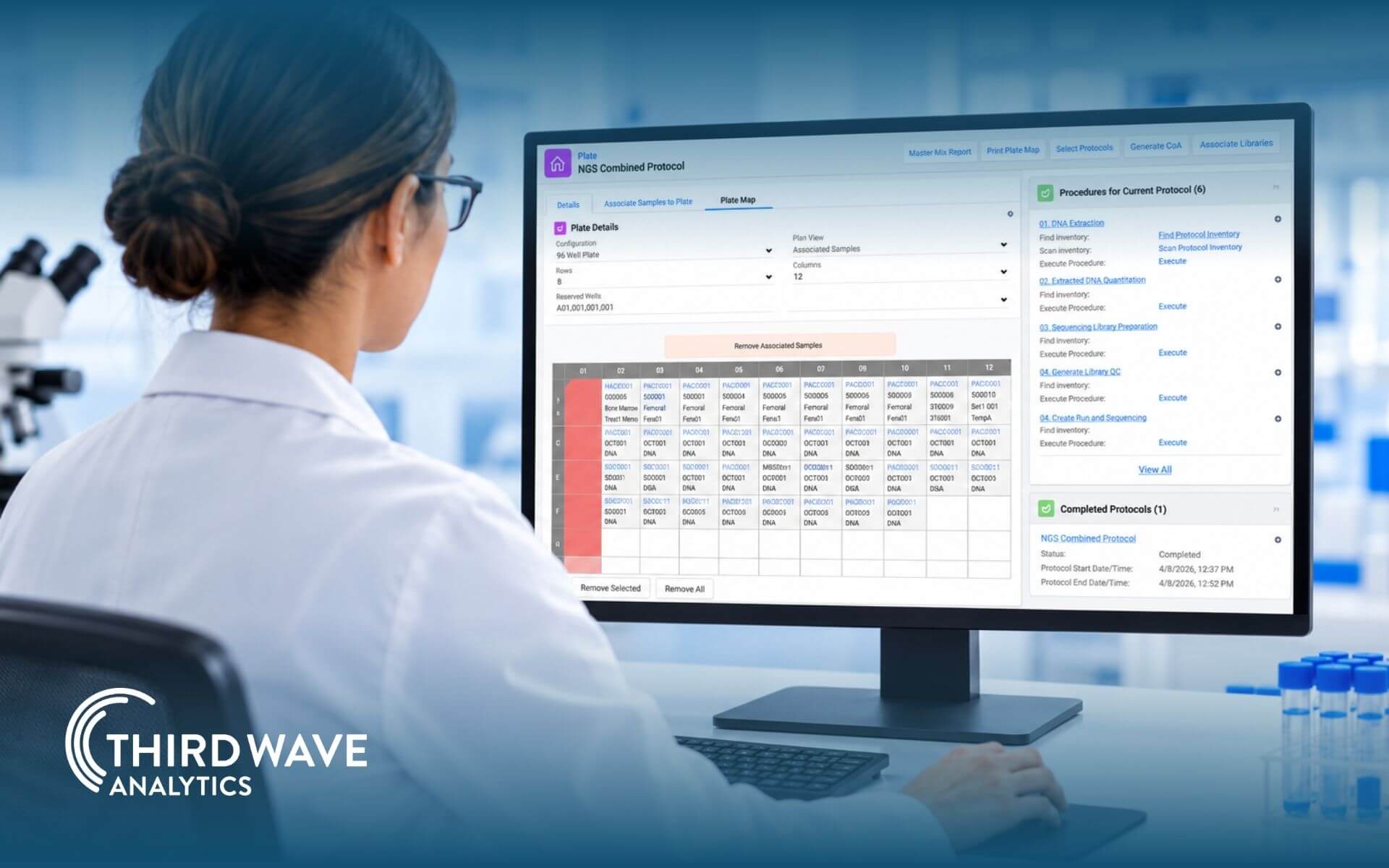
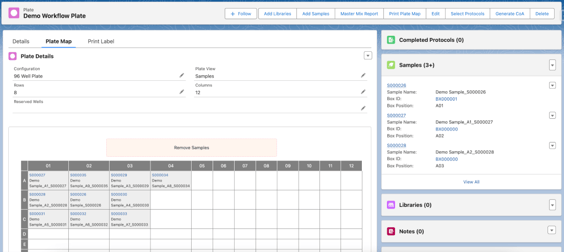
- Visually manage samples and libraries using configurable Plate Maps, with drag-and-drop placement, automatic well assignment, and the ability to reserve wells for controls or standards. Users can remove or reassign materials as workflows change, maintain a history of Plate Map changes, and generate customizable PDF Plate Maps for bench use.
Workflow Automation & Supported Actions
- Use configurable Supported Actions to perform additional activities directly within Protocol Execution, including querying and updating records, launching flows, opening custom pages, and capturing custom inputs.
- Configure Query Supported Actions to control which records users see and how they are presented, including defining and locking sort order, limiting the number of displayed records, using simple nested queries, and displaying related record information during multi-record editing.
- Automate sample-processing calculations and alert users when defined quality control standards are not met.
- Connect Protocol Execution with inventory management, automatically consuming materials or creating new inventory as work is completed.
Audit Trails & Version History
- Track workflow, protocol, and procedure status and maintain start and completion information throughout execution.
- Maintain historical versions of tests and the samples associated with each version.
- Protect data integrity with non-editable, date- and time-stamped audit trails of test result history.
- Import and export data during procedure execution and perform mass updates when working with larger groups of records.
Instrument Integration & PDF Reporting
- Generate shareable PDF reports containing test results and automatically deliver them to designated contacts.
- Integrate with laboratory instruments to send and receive data, transmit instruction files, capture test results, and support automated data transfer between the LIMS and laboratory technology.
By bringing procedures, test results, samples, materials, and automation together in one connected workflow, Lockbox LIMS helps laboratories standardize how work is performed, while reducing manual steps and improving traceability. Rather than simply documenting what happened after testing is complete, Protocol Execution actively guides laboratory personnel through the process, surfacing the right information and actions at each stage, and triggering downstream activities automatically as work progresses. The result is a workflow that runs itself forward, instead of one that only gets reviewed after the fact.
Inventory Management Capabilities
Reagents run low. Kits expire. Consumables get used up mid-protocol. Without a system tracking it all, labs end up managing supply levels through spreadsheets, sticky notes, or someone’s memory of what’s left in the cabinet. That’s how testing gets delayed: waiting on materials that should have been reordered weeks ago.
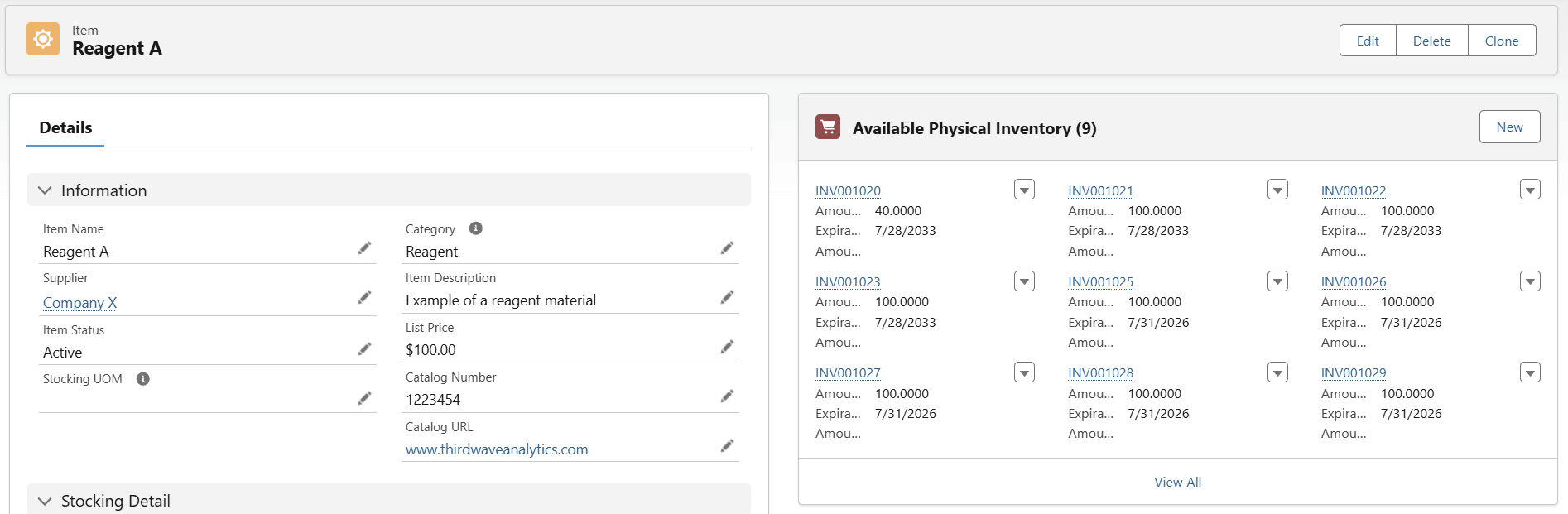
Lockbox LIMS Inventory Management module gives laboratories a connected view of inventory from receipt through consumption, using Lockbox’s Item Master to track raw materials, finished goods, and everything in between.
From receipt to consumption, Inventory Management keeps every material accounted for:
Stock Tracking & Item Master
- Track quantity on hand (QOH), quantity available, quantity reserved, and consumed inventory.
- Maintain an item master and supplier master table.
- Designate inventory as single- vs. multi-use inventory.
- Track discrete and non-discrete inventory consumption and creation.
Protocol-Linked Automation
- Automate the creation of new inventory upon protocol completion.
- Automatically decrement inventory upon protocol completion.
- Add a “Bill of Materials” to any protocol.
- Designate any materials that are synthesized/created as a result of a protocol being completed.
Reordering & Expiration Alerts
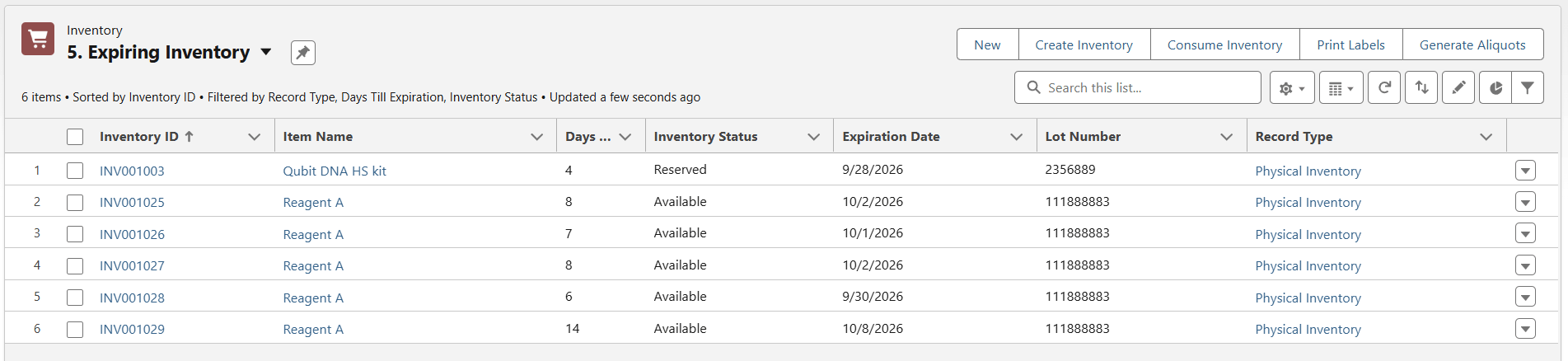
- Receive automated alerts when inventory falls below specified thresholds.
- Be notified of any material that will expire within a specified number of days.
- Set expiration timeframes and alerts.
- Capture unit costs, ordering instructions, re-order amounts, and shipment details.
Barcode Tracking & Data Import
- Create new inventory via a CSV import or by using a single-click update feature.
- Use barcode scanning to track each item from receipt through consumption.
- Customize inventory status to match your existing process.
- Track date reserved, date used, and date created.
By connecting inventory levels, protocol consumption, and reordering thresholds in one system, Lockbox LIMS gives labs a real-time view of what’s on hand and what’s about to run out. Instead of discovering a shortage mid-protocol, teams can see it coming and reorder before it ever becomes a bottleneck.
Instrument Management Capabilities
Tracking equipment reservations, managing instrument maintenance, and recording calibration can be a challenge for any lab. When you add the Instrument Management module, you gain a centralized way to manage the entire lifecycle of your instruments: installation, daily use, servicing, calibration, and eventual retirement.
From reservation to retirement, Instrument Management keeps every piece of equipment accounted for:
Maintenance & Calibration Scheduling
- Automate calibration, preventive maintenance, and warranty expiration reminders.
- Store instrument calibration records and run information associated with a particular instrument.
- Keep a log of all instrument incidents, including planned vs. unplanned events.
- Track installation, maintenance, and up-time/down-time.
Reservations & Authorized Access
- Schedule instrument usage with a shared reservations calendar.
- Limit instrument access to authorized, trained team members using qualifications from the Lockbox QMS Training module.
- Allow external users to submit reservation requests through the Customer Portal for a self-service experience.
Instrument Documentation & Vendor Details
- Track all instrument vendor details, phone numbers, and contact information.
- Store operating manuals, calibration results, and quality documentation for each instrument.
- Document asset numbers, model, serial numbers, and software/firmware versions.
Compliance & Audit Readiness
- Correlate instruments to protocols, procedures, and workflows for historic traceability.
- Maintain audit-ready records supporting ISO 17025, GLP, GMP, 21 CFR Part 11, EU Annex 11, CLIA, and CAP standards.
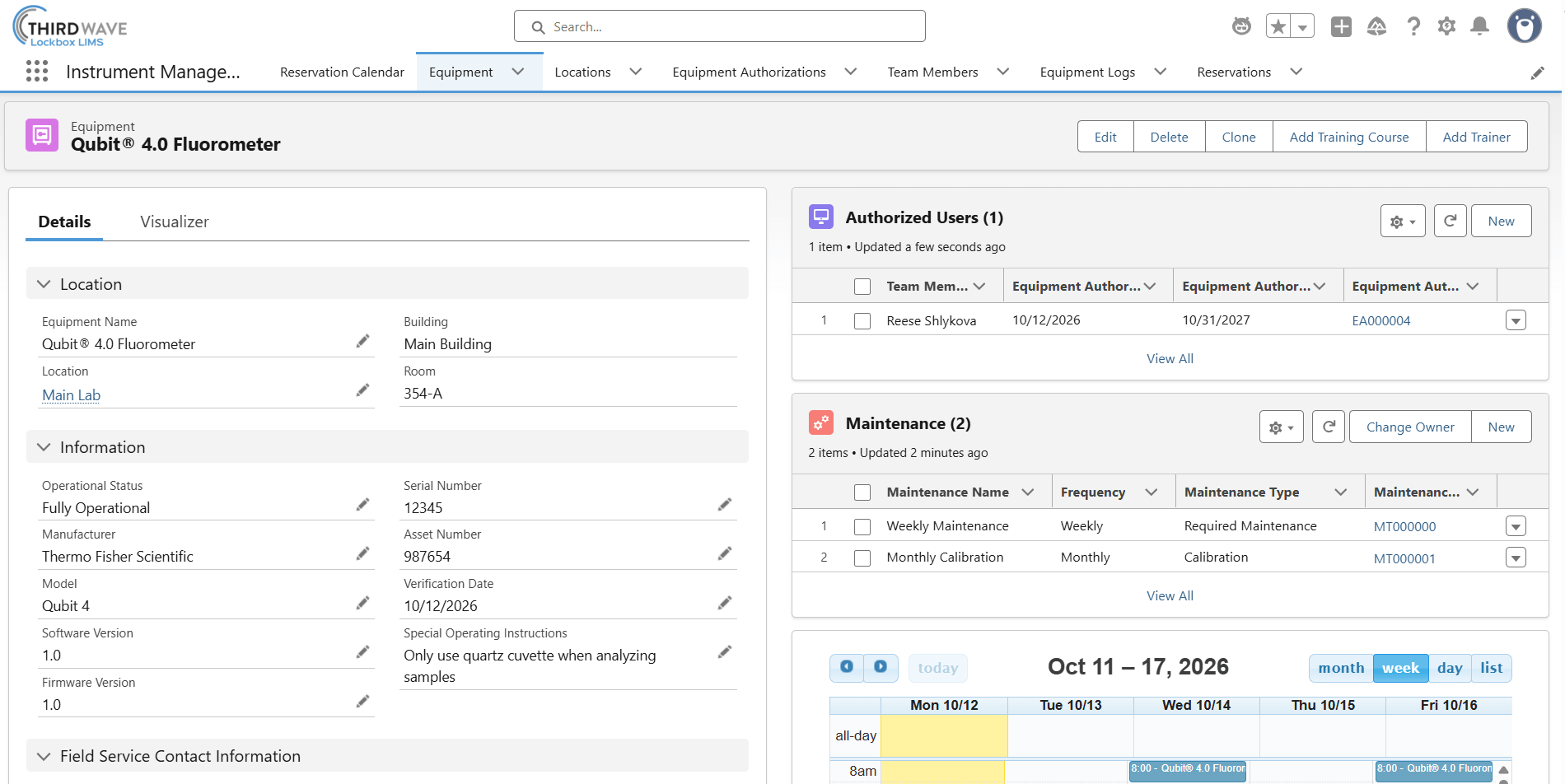
By connecting maintenance schedules, reservations, documentation, and compliance records in one system, Lockbox LIMS Instrument Management capabilities give labs full visibility into every instrument’s lifecycle. Instead of tracking calibration due dates on a whiteboard or chasing down who last used a shared instrument, teams can see status, availability, and service history at a glance and trust that the record is inspection-ready when it matters.
Next-Generation Sequencing (NGS) Capabilities
NGS technology has revolutionized the field of biological sciences, but it’s also introduced a layer of complexity. Libraries, indexes, pools, and flow cells all need to be tracked without a single index collision slipping through. Lockbox LIMS is ready to help you manage your NGS projects efficiently, covering the full workflow from library preparation through sequencing run.
From library to lane, the NGS module keeps every step of sequencing traceable:
Library Preparation & Pooling
- Allow child diluted libraries to be created from a parent library record.
- Allow users to add an index to a library.
- Allow users to create library field sets.
- Generate work queue views to see the status of plates, pools, and flow cells.
Pool Management & Index Collision Checks
- Allow users to create a new pool record and add libraries to a pool.
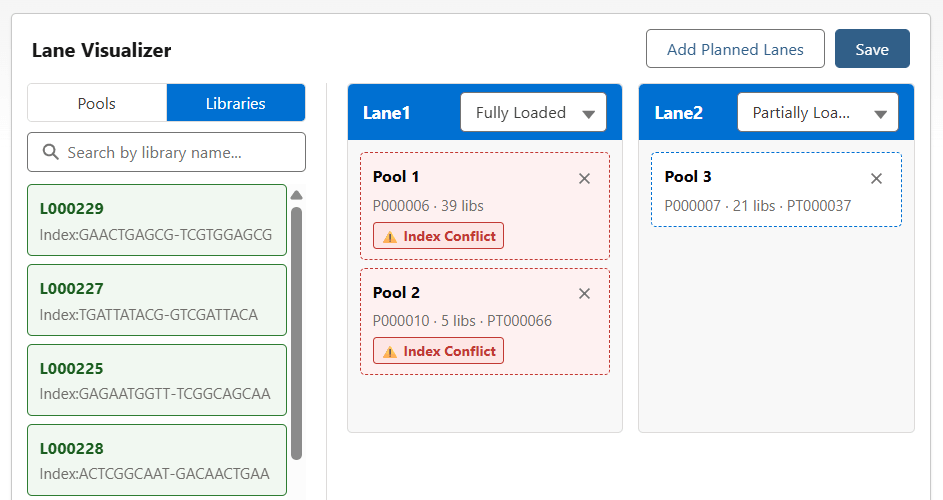
- Alert the user if there are index collisions when libraries are selected for the pool.
- Implement system checks on indexes when pools are added to a lane, ensuring indexes across all pools are unique.
Flow Cell & Lane Configuration
- Allow users to create a new flow cell record, with lanes auto-populating automatically.
- Allow users to add pools or individual libraries to a flow cell lane.
- Tag reagents to flow cells to track reservations and usage.
Run Tracking & Sample Sheet Generation
- Associate flow cells to sequencing runs and track run status and attributes.
- Generate sample sheets automatically, populated with data from sample or library records.
- Export sample sheets in configurable formats to meet different instrument requirements.
By connecting library prep, pooling, flow cell design, and run tracking in one system, the NGS module gives sequencing labs the traceability high-throughput workflows demand, catching index collisions before they cost a run, instead of discovering them after the data comes back wrong.
Lockbox QMS Modules
Meeting quality standards takes more than good lab work; it takes documented procedures, tracked deviations, and trained personnel who can prove they followed the process. When that proof lives in shared drives, paper binders, and spreadsheets, audits become a stressful scramble instead of a formality. Lockbox QMS is Third Wave Analytics’ comprehensive quality management system. The Document Control, Quality Events, and Training Management modules connect directly to your LIMS data, so quality processes stay tied to the samples, protocols, and people they govern.
Document Control Management
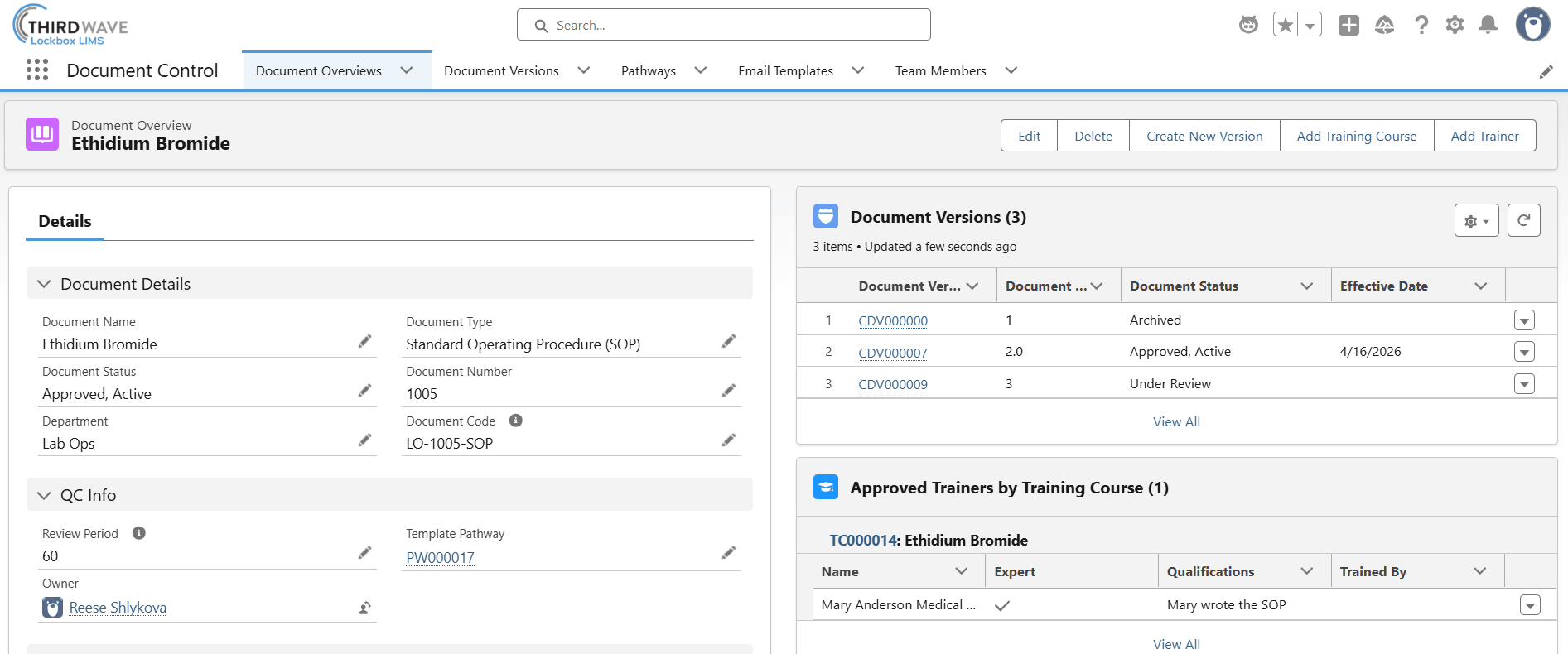
Standard operating procedures only work if everyone is using the current version. The Document Control module tracks controlled documents from creation through revision, approval, and retirement, ensuring the latest approved version is always the one in use.
From draft to retirement, the Document Control module keeps every procedure current and traceable:
Controlled Document Management
- Store all quality documents (SOPs, work instructions, forms, and policies) in one centralized, searchable location.
- Track current and historical document versions, ensuring only the latest approved version is accessible.
- Restrict unauthorized users from accessing or revising controlled documents.
- Capture comments and revision notes for each document.
Approval Workflows & E-Signatures
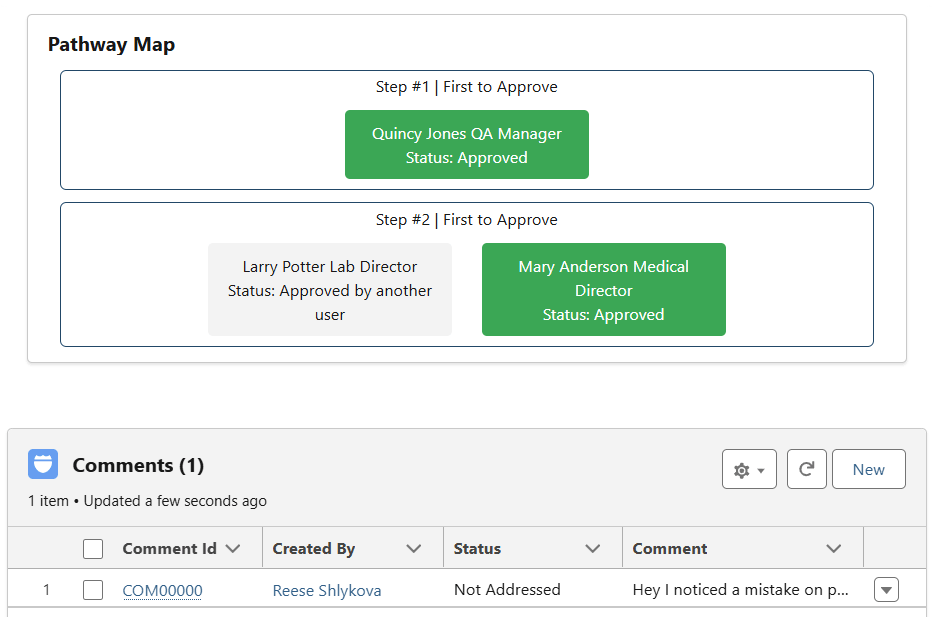
- Configure one or more approval pathways for any document type.
- Automate approval handoffs and route revisions for review.
- Support electronic signatures for document approvals, creating a secure, traceable approval record.
- Automate notifications when documents are approved or nearing their review date.
Audit Trails & Compliance
- Track who reviewed and approved each document, and when.
- Maintain a complete revision history: what changed, who changed it, and when it took effect.
- Connect with Lockbox LIMS to ensure only approved documents are used in laboratory workflows.
By keeping controlled documents, approvals, and revision history in one connected system, Document Control gives labs confidence that staff are always working from the current procedure and gives auditors a clear, complete trail to inspect.
Quality Events
Deviations and corrective actions are inevitable. The question is whether your lab can track them consistently and close them on time. The Quality Events module moves deviation and CAPA tracking off paper and into a system that automates approvals and keeps every event visible from creation to closure.
From deviation to resolution, the Quality Events module keeps every issue accountable:
Deviation Tracking
- Classify deviations as planned or unplanned.
- Automatically route deviations to quality and lab managers for approval.
- Track the resolution time through automatic logging of creation and approval dates.
- Associate deviations with team members, procedures, samples, plates/batches, and reagents.
CAPA Management
- Track root causes and connect one or more deviations to a CAPA.
- Record target due dates and verification methods to evaluate CAPA effectiveness.
- Review and approve each component of a CAPA, including description, plan, and closure.
- Automate and configure CAPA approval workflows.
Reporting & Cross-Module Connections
- View open/closed status and track resolution time in real time.
- Generate reports to track multiple deviations or CAPAs simultaneously.
- Connect CAPAs directly to the Document Control and Training modules.
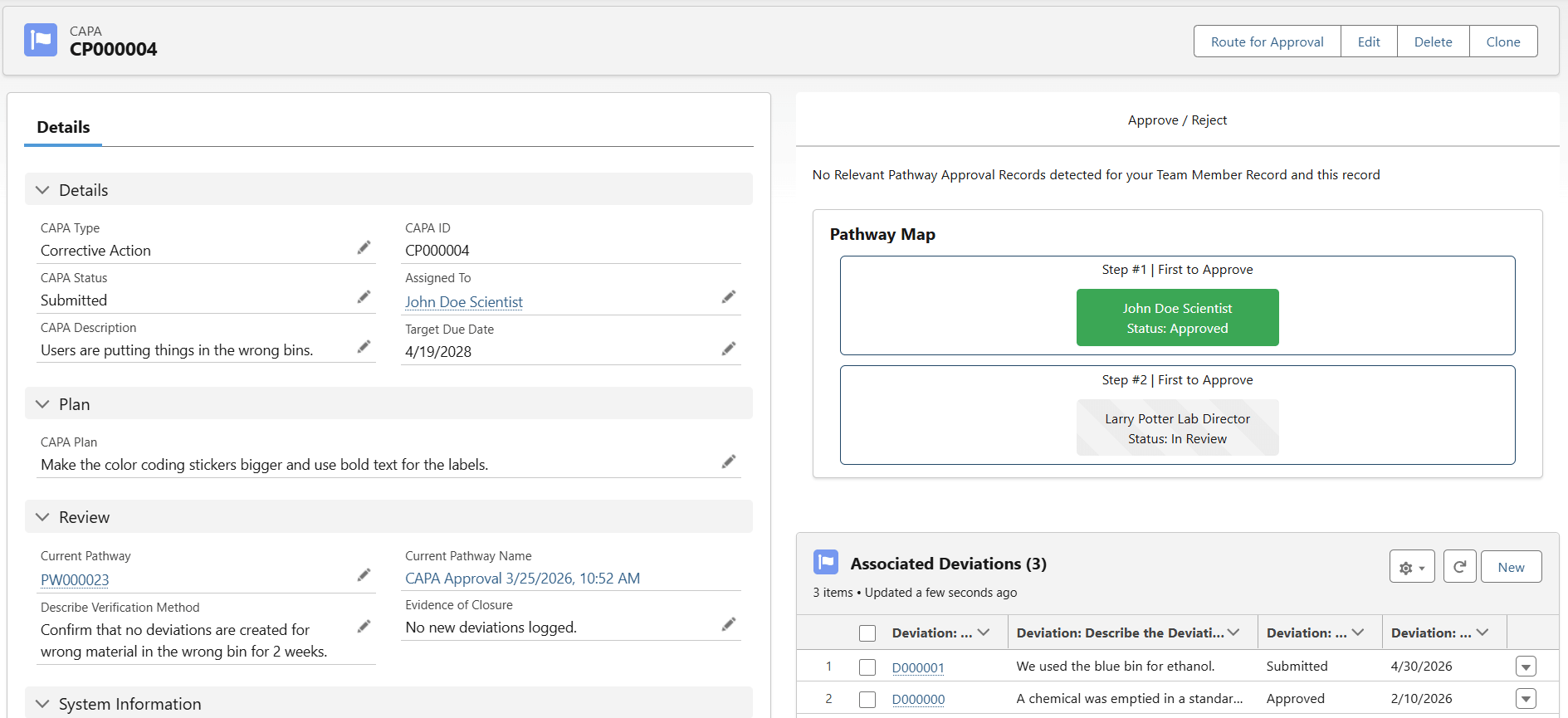
By tracking deviations and CAPAs in one connected system, Quality Events gives quality managers real-time visibility into what’s open, what’s overdue, and what’s been resolved, replacing paper logs with a record that’s ready whenever an audit requires it.
Training Management
Trained staff is a compliance requirement, not just a best practice, but proving who’s trained on what can be its own full-time job. The Training Management module gives every team member a digital training record, and gives managers a 360° view of who’s current, who’s due, and who’s overdue.
From onboarding to recertification, the Training Management module keeps every team member accounted for:
Training Records & Report Cards
- Store each user’s complete training record in a digital training Report Card.
- Visualize completed, pending, and past-due training requirements at a glance.
- Retain all training certifications and historical training records.
- View the protocols, equipment, and controlled documents each team member is trained on.
Digital Training Plans & Curricula
- Generate a curriculum of required training courses based on each team member’s role.
- Capture training participants, training dates, and trainers.
- Assign team members as approved trainers for specific courses.
- Automate retraining by setting training frequency and reminder notifications.
Automated Alerts & Access Restrictions
- Automate alerts and reminders for upcoming training, expiring certifications, and overdue requirements.
- Restrict protocol execution and equipment use based on training completion status.
- Search by team member or course to retrieve specific training records.
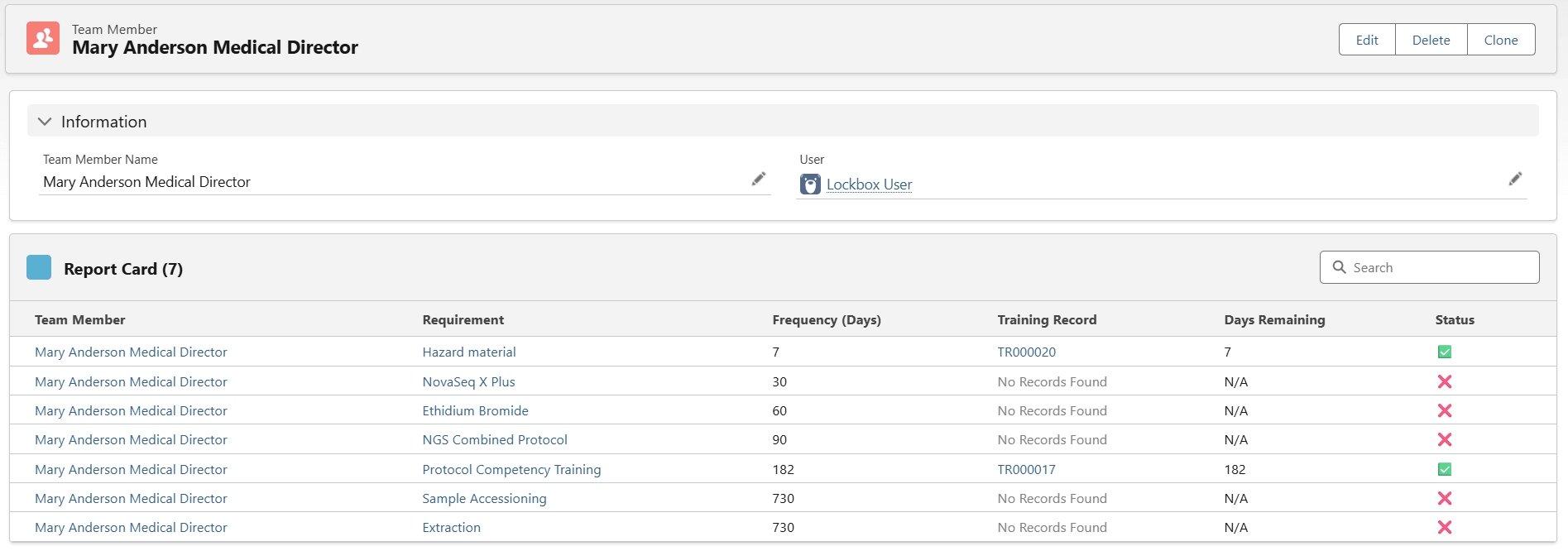
By connecting training records, curricula, and equipment or protocol access in one system, Training Management ensures only qualified staff perform regulated work and gives managers a clear answer, at any moment, to the question, “Is everyone current?”
AI-Powered Features to Streamline Laboratory Workflows
Searching for samples, updating records, and entering data are some of the most time-consuming tasks in a busy laboratory. Lockbox LIMS now supports AI-powered capabilities that help automate many of these everyday activities, allowing laboratory staff to find information faster and reduce manual data entry. These capabilities are possible because Lockbox LIMS is built on the Salesforce platform. That foundation gives laboratories access to Salesforce’s enterprise AI tools, including Agentforce and Prompt Builder, along with the security infrastructure Salesforce has developed to protect sensitive data.
Agentforce Agents
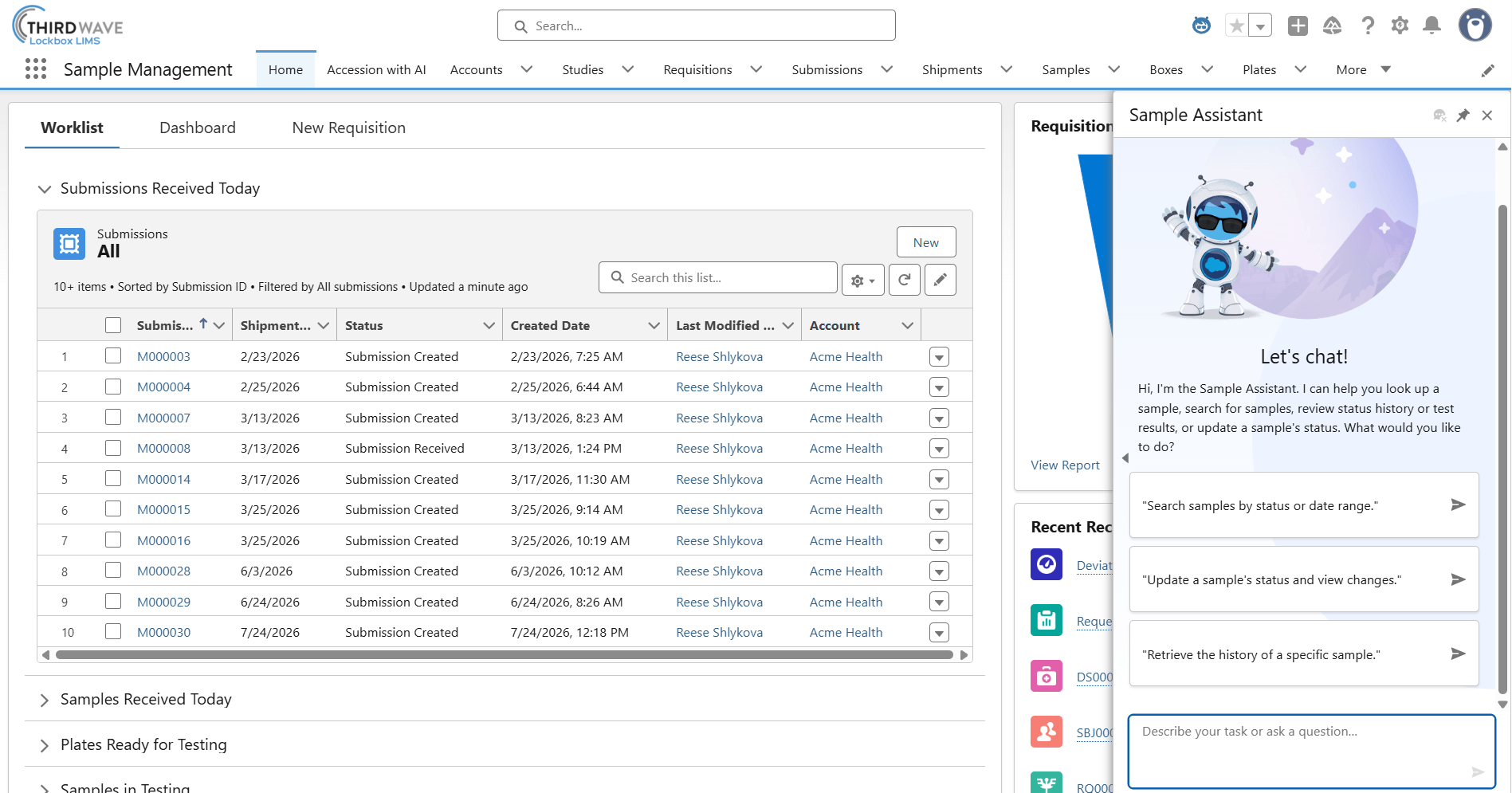
Using the Agentforce Builder, system administrators can build, test, and deploy AI agents in Lockbox LIMS. Agentforce agents are built using low-code templates, process real-time data with large language models (LLMs) to orchestrate flows and APIs, and strictly respect user permissions by operating under the context of the logged-in user. The Lockbox Sample Assistant is an example of an agent built to support lab technicians in finding samples and reviewing details like status and test results. This agent was configured by Third Wave Analytics using the Agentforce Builder.
The Lockbox Sample Assistant allows users to interact with the system using natural language. Rather than navigating multiple screens or running complex searches, laboratory staff can simply ask questions like, “Find all whole blood samples submitted today,” or “Show me the test results for sample 994.” The AI assistant can quickly retrieve sample information, display test results, identify out-of-specification results, and even guide users through approved workflow updates with built-in confirmation steps to help protect data integrity.
Prompt Builder
Prompt Builder is a low-code development workspace that allows users to build, test, and manage custom AI instructions (called “prompt templates”) directly inside Lockbox LIMS. When triggered, Prompt Builder acts as an orchestration layer. It compiles the template, dynamically injects the relevant record variables, and securely routes the finalized prompt to a foundational Large Language Model (LLM), giving laboratories the flexibility to choose from enterprise models created by OpenAI, Anthropic, or Google. Processing sensitive laboratory data through external LLMs requires strict security guardrails. Prompt Builder mitigates these risks by routing all transactions through the Einstein Trust Layer, which enforces strict technical security protocols, including PII/PHI data masking and a zero retention guarantee to ensure external models never cache, log, or use your lab’s data for model training purposes.
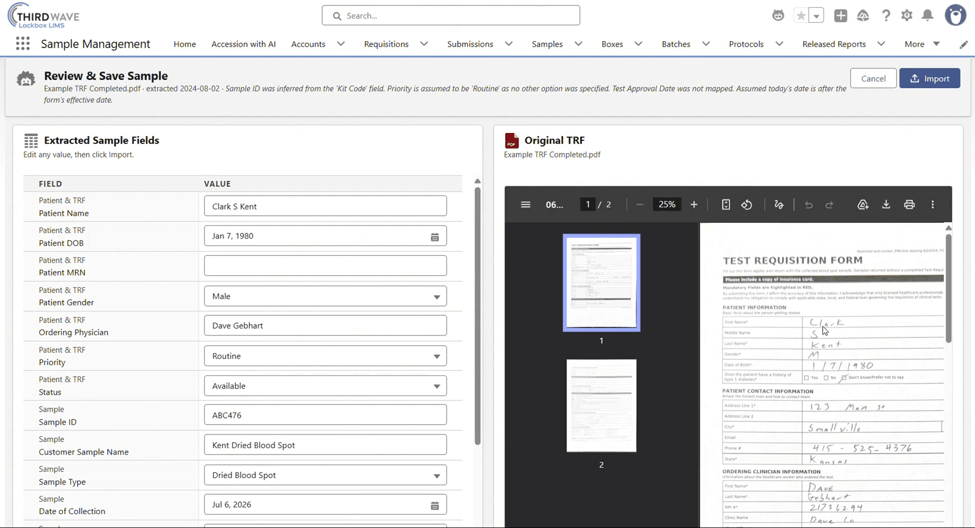
Lockbox’s Accession with AI is an example of an AI tool powered by the Prompt Builder. This tool helps simplify accessioning by automatically extracting patient and sample information from uploaded PDF documents, such as test requisition forms. Instead of manually entering data, users can review the AI-extracted information and import it directly into Lockbox LIMS, reducing transcription errors and saving valuable time.
Collaboration & Lockbox LIMS Customer Portal
Research doesn’t happen in isolation. Labs run on constant back-and-forth between PIs, labmates, staff, and outside collaborators, while customers and physicians need visibility into their own samples and results. When that communication lives across email threads, shared drives, and phone calls, updates get missed and your staff spend time on status checks instead of testing.
Lockbox keeps both internal and external communication tied directly to the records they concern:
Internal Collaboration
- Share updates and collaborate in lab chatter or Slack groups, with visibility into changes made to samples, boxes, studies, and more.
- Add notes and tasks to samples, participants, protocols, and storage to stay organized across studies.
- Integrate with existing Microsoft or Google tools like Outlook, Word, Gmail, or Google Calendar.
External Access via Customer Portal
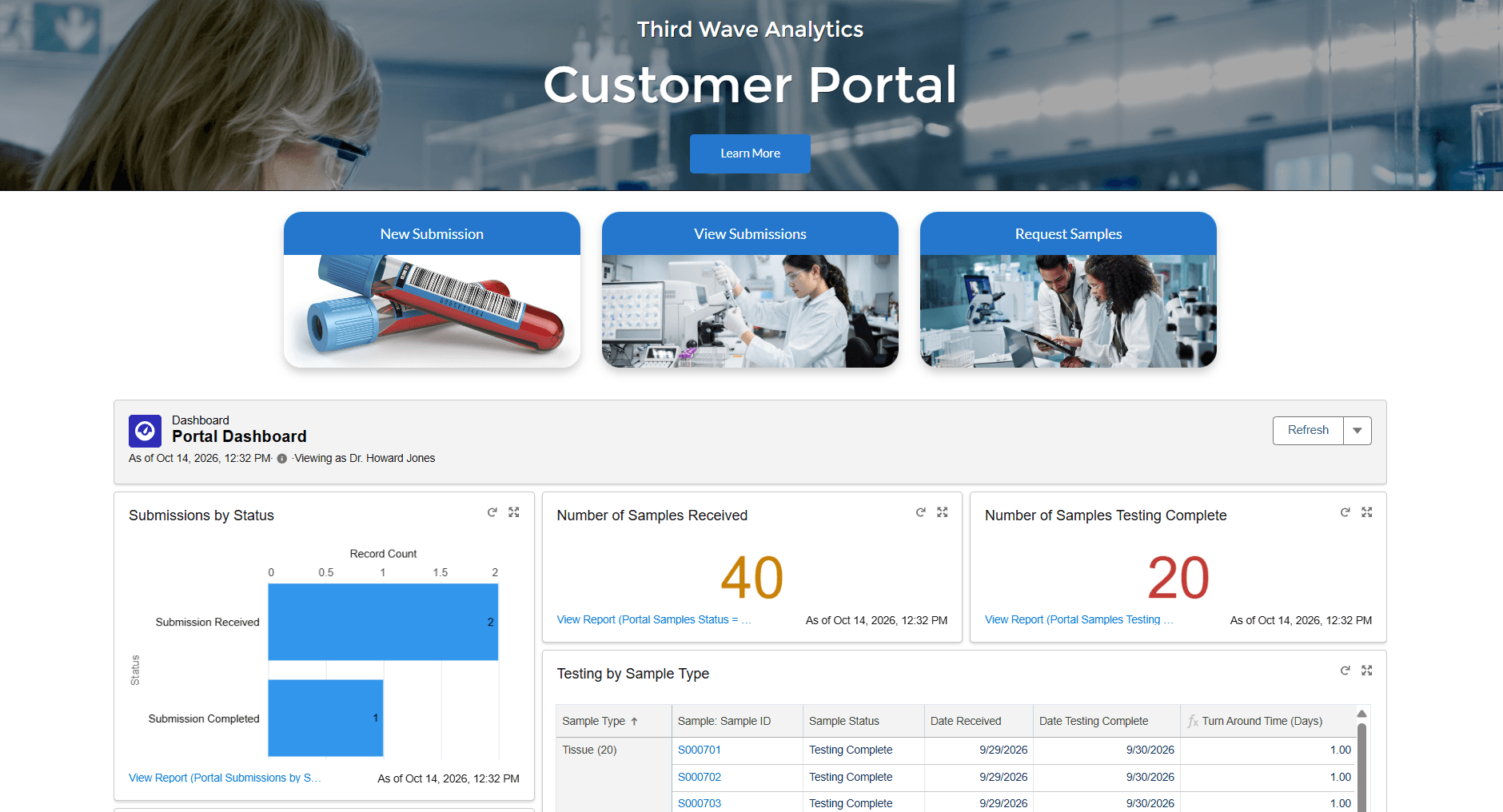
- Let customers, physicians, and collaborators submit requisitions, sample manifests, and service requests directly into the LIMS. No integrations are required.
- Provide real-time status updates and automatic notifications when results are ready.
- Secure access with modern authentication, role-based permissions, and a complete audit history, supporting HIPAA and CLIA compliance.
By keeping internal updates and external submissions tied to the records they concern, Lockbox LIMS replaces scattered emails and phone check-ins with one connected system, so nothing important gets buried, and your team spends less time on status updates and more time on the work only they can do.
Bringing It All Together
From study setup to sample check-in, storage to sequencing, Lockbox LIMS is built to grow alongside your laboratory, not force your laboratory to grow around it. The capabilities included with every subscription give teams a strong foundation: connected study management, end-to-end sample tracking, and flexible storage that mirrors your lab’s physical footprint. From there, add-on modules let you build out exactly what your lab needs next, whether that’s protocol automation, inventory tracking, instrument management, NGS support, or a full QMS suite for document control, quality events, and training.
That’s the real value of a modular LIMS: you’re not paying for capabilities you don’t use, and you’re never stuck outgrowing the system you started with. As your lab takes on new projects, adds staff, or scales into new regulatory territory, Lockbox LIMS scales with you.
Lockbox LIMS 2.21 represents the latest step in the evolution of a comprehensive laboratory information management system, providing exciting new features that expand the capabilities of laboratories for managing their data, workflows, and day-to-day operations.
It’s time to explore how Lockbox LIMS can work for you and allow you to return your focus to science.